


If you are trying to run an NBAD balance inquiry around payday, you have probably noticed that half the links online either refuse to load or bounce you to a completely different website.
That happens because the National Bank of Abu Dhabi (NBAD) merged with First Gulf Bank to form First Abu Dhabi Bank (FAB), and the bank later moved its prepaid card portal under its payments arm, Magnati. Even though the bank changed its name years ago, company PROs, HR managers, and camp supervisors across the UAE still hand out payroll cards and say, “Here is your NBAD Ratibi card.”
Whether you hold a Ratibi NBAD salary card, a standard PPC NBAD (Prepaid Card), or an old savings account, your card still works normally—you just need the updated portal to check your money. Below is a quick breakdown of the fastest ways to check your balance right now.
| Card or Inquiry Method | How to Check Your Balance |
| Ratibi & PPC Web Portal | Visit (https://ppc.magnati.com/ppc-inquiry) using the last 4 digits of your card and your 13-digit Card ID (Free). |
| Payit Digital Wallet App | Sign up with your Emirates ID and registered UAE mobile number for instant one-tap salary tracking (Free). |
| FAB Mobile Banking App | Log in with your Customer ID or debit card to view standard bank accounts and reloadable cards (Free). |
| SMS Balance Check | Text BAL followed by a space and the last 4 digits of your card to 2121 from your registered phone. |
| FAB ATM Booths | Insert your physical card and enter your 4-digit PIN at any blue FAB ATM across the UAE (Free). |
Understanding NBAD Balance Inquiry in the FAB Era
When the National Bank of Abu Dhabi (NBAD) became First Abu Dhabi Bank (FAB), every account, ATM machine, and payroll card migrated into the new system. Soon after, FAB placed its prepaid card operations under Magnati, its dedicated payment technology company.
For everyday workers and residents in the UAE, this created a bit of confusion on payday:
- People still use the old name: Walk into almost any HR office or labor accommodation in Mussafah, Al Quoz, or Sajaa, and everyone still calls the blue payroll card an NBAD card or NBAD Ratibi.
- The old web address moved: Typing the old
nbad.comaddress to reach the nbad prepaid card inquiry system will redirect you throughbankfab.comover to the Magnati PPC portal (ppc.magnati.com). - Prepaid cards are not bank accounts: If you hold an nbad bank prepaid card or Ratibi card, you do not have a traditional checking account or an IBAN. If you try logging into the main nbad online banking page meant for savings accounts, the website will reject your details. You have to use the prepaid inquiry page or the Payit app instead.
How to Do an NBAD Prepaid Card Balance Inquiry Online (PPC Portal)?
Most people searching for a fab nbad balance check just want the simple web page where you punch in your card numbers and see your cash immediately—no passwords, no usernames, and no app downloads required.
What is the FAB NBAD PPC Inquiry System?
“PPC” simply stands for Prepaid Card. The nbad prepaid card enquiry system is a quick web tool built for payroll and prepaid cardholders. Because your card doesn’t come with a traditional online banking login, the fab nbad ppc page uses two sets of numbers printed directly on your plastic card to pull up your live dirham balance and recent spending.
Step-by-Step Guide to PPC NBAD Balance Check Online
Grab your physical card and follow these steps to run a ppc nbad balance check online in under thirty seconds:
- Open the PPC Inquiry Page: Open your phone’s web browser and go to the FAB Ratibi page on
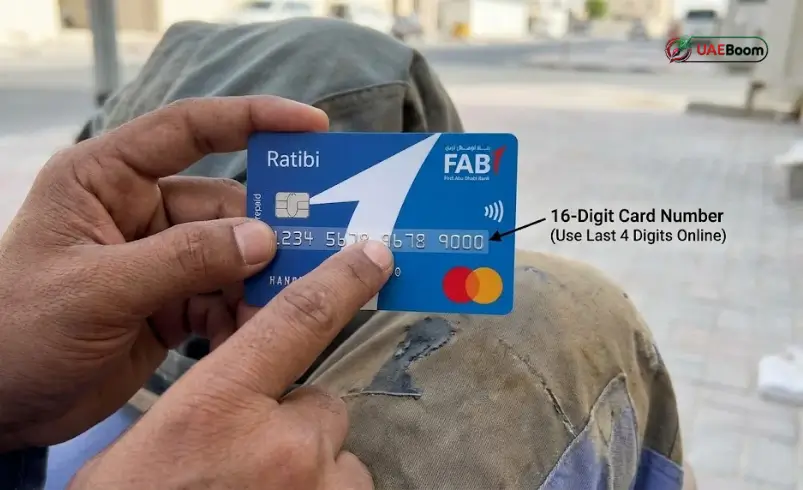
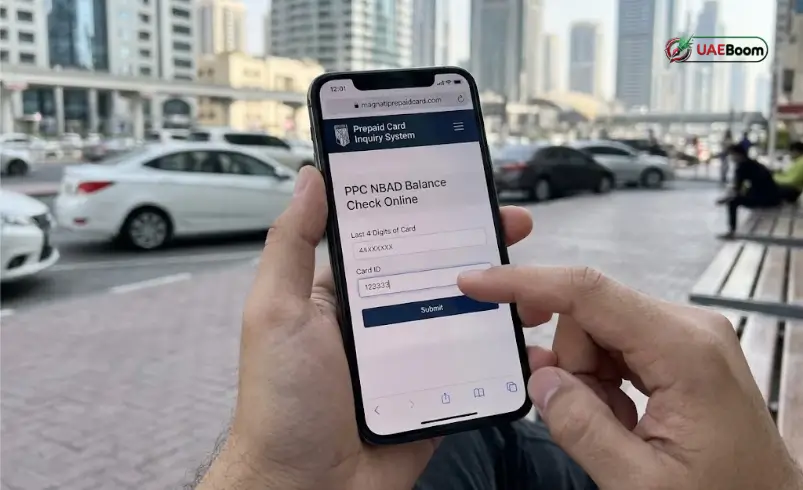
bankfab.com, or head straight to the card processor portal atppc.magnati.com/ppc-inquiry - Enter the Last Digits of Your Card Number: Look at the front of your card where the long 16-digit Visa or Mastercard number is printed. Type the last 4 digits into the first box (Note: Some older versions of the portal asked for the last 2 digits, so just check what the label on the box asks for, though the current Magnati form asks for the last 4 digits).
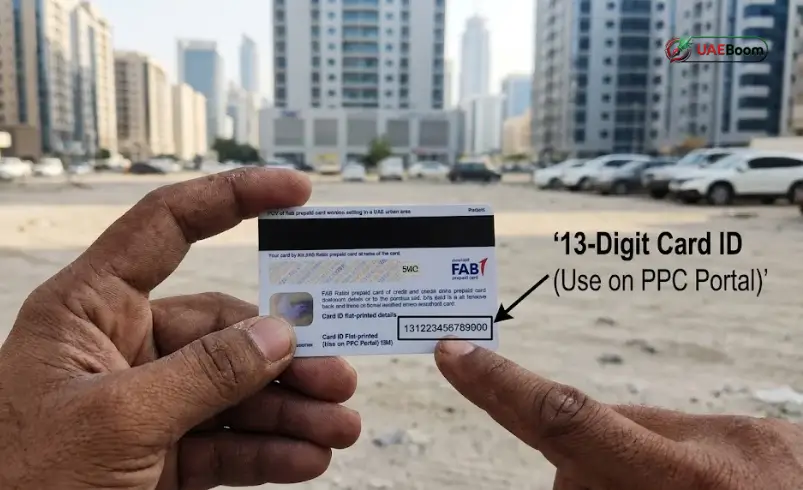
- Find and Enter Your Card ID: Flip your card over to the back. Look near the bottom edge, right underneath the black magnetic stripe or next to the white signature strip. You will see a 13-digit number printed flat on the plastic—that is your Card ID. Type that entire number into the second box without any spaces.
- Type the CAPTCHA Code: Enter the letters or numbers shown in the security image box so the system knows you are a real person.
- Hit “Go”: Tap the Go button. The page will load your exact nbad balance along with your latest deposits and withdrawals.
Because mixing up the numbers on the front and back of the card is the most common reason people get locked out, keep this quick guide in mind:
| Number on Your Card | Where to Find It & How to Use It |
| 16-Digit Card Number | Printed across the front of your card. Only enter the last 4 digits in the first box of the PPC portal. |
| 13-Digit Card ID | Printed on the back of your card (bottom corner below the black stripe). Enter the full number in the Card ID box. |
| 3-Digit CVV Code | Printed on the back next to the signature strip. Never type this into a balance check website; it is only for online shopping. |
Common PPC Portal Errors and How to Fix Them
If the nbad prepaid card inquiry page throws an error or clears your boxes without showing your money, check these four things first:
- Swapping the Card Number and Card ID: If you type the 16-digit number from the front of the card into the Card ID box, the system will fail every time. Always pull the Card ID from the back of the card.
- Worn-Out Plastic: If your card has been sitting in your wallet for two years and the Card ID on the back has rubbed off, check the original paper envelope your card came in—the Card ID is printed right on the welcome letter. If you lost the letter too, call 600 52 2298 and customer support will help you verify your card.
- Extra Spaces: Make sure your phone’s keyboard didn’t automatically put a space at the end of your Card ID.
- Stale Browser Tabs: Many people keep the ppc nbad tab open on Chrome or Safari all month and just hit “Go” when payday comes. The security session expires after a few minutes, so always refresh the page before typing your numbers.
Ratibi NBAD Salary Card: Complete Balance Inquiry & Statement Guide
For thousands of technicians, drivers, retail staff, and construction workers across the Emirates, the nbad ratibi card is how they get paid every month. Running an nbad bank balance check salary card online is the easiest way to see if the company has released wages without walking to an ATM in the heat.
What is the NBAD Ratibi Card?
The Ratibi card is a government-compliant payroll card issued under the UAE’s Wage Protection System (WPS). Most UAE banks require a minimum monthly salary of AED 5,000 or more to open a standard bank account. To make sure employees earning up to AED 5,000 still get paid safely and on time, companies issue Ratibi cards. There are no minimum balance fines, no monthly maintenance charges, and your wages land directly on the card as soon as your employer processes payroll.
How to Check Your NBAD Bank Balance for a Salary Card Online
When you want to do a ratibi nbad card balance inquiry, you don’t have to wait for bank clearing times. With a salary nbad prepaid card balance inquiry, the second your HR department’s WPS salary file clears with FAB, the cash is live on your card.
You can check it online in two ways:
- Via the Magnati PPC Web Link: Best when you are borrowing a friend’s phone or just want a quick check without installing apps.
- Via the Payit Wallet App: Best if it is your own smartphone, because you only register your card once and can check your nbad salary anytime with your fingerprint.
Downloading and Reading Your Ratibi NBAD Salary Card Statement
Sometimes you need more than just your current balance—you might need a ratibi nbad salary card statement to prove your salary was paid, track down a missing transaction, or show proof of income.
When you check your history on the ppc nbad balance check online screen or inside the FAB Mobile / Payit app, you will see a clean breakdown of your money:
- Salary Credits: Shows the exact date and dirham amount your company loaded onto the card.
- ATM Withdrawals & POS Purchases: Lists every time you took cash out of an ATM or swiped your card at a grocery store or pharmacy.
- Mini-Statement at the ATM: If you need a physical paper slip right away, slide your card into any FAB ATM, enter your PIN, and tap Mini-Statement to print out your last 10 transactions.
- Full 12-Month PDF Statement: If you register your prepaid card on FAB Online Banking or the mobile app, you can open the Statements tab and download up to 12 months of transaction history as a PDF.
How to Know When Your Salary is Credited?
You don’t actually have to keep running an nbad ratibi balance check every two hours at the end of the month. Every Ratibi card comes with free SMS salary alerts. As soon as your salary hits the card, FAB sends a text message straight to your phone.
If your coworkers are getting salary texts and you aren’t, your old mobile number is probably still on file. Ask your company HR or PRO to update your current Etisalat (e&) or du number in the Ratibi system, or call FAB support to link your new SIM card.
Checking Your FAB NBAD Balance via Mobile Apps
Typing a 13-digit Card ID into a tiny mobile browser gets old fast. Setting up one of FAB’s official mobile apps turns a two-minute chore into a two-second tap.
Using the Payit Digital Wallet for Ratibi Cardholders
Payit is FAB’s all-in-one digital wallet app, and if you hold an nbad ratibi card, it is hands-down the best app you can put on your phone.
How to link your Ratibi card to Payit:
- Download the Payit app from the Google Play Store, Apple App Store, or Huawei AppGallery.
- Open the app, enter your UAE mobile number, and type in the verification OTP sent via SMS.
- Scan the front and back of your Emirates ID with your phone camera and take a quick selfie to verify your identity.
- Follow the prompt to link your Ratibi Card using your card number and Card ID.
- From that point on, your live fab nbad balance check online shows up right on the home screen whenever you unlock the app.
Once your card is inside Payit, you don’t have to stand in long queues at exchange houses on payday. You can send money home to India, Pakistan, the Philippines, Bangladesh, Egypt, and dozens of other countries directly from the app, recharge your local or international mobile balance, and pay bills with zero hassle.
Using the FAB Mobile Banking App for Standard Accounts & Prepaid Cards
If you have a standard FAB savings account, current account, credit card, or a reloadable PayPlus prepaid card, you can also use the main FAB Mobile app:
- Download FAB Mobile from your phone’s app store.
- Register using your Customer ID or choose Debit/Prepaid Card Number + PIN.
- Enter the SMS OTP sent to your registered phone number and set up Face ID or fingerprint login.
- Tap Cards on the bottom menu, pick your prepaid or Ratibi card from the list, and your real-time balance and recent spending will pop right up.
How to Check Your NBAD Bank Balance Without Internet
We have all been caught outside with zero mobile data and no public Wi-Fi in sight. When you are offline, you still have three reliable ways to complete an nbad bank balance enquiry.
Checking Balance at an NBAD / FAB ATM
Walking up to an ATM is the classic offline method, and it costs nothing as long as you use the right machine:
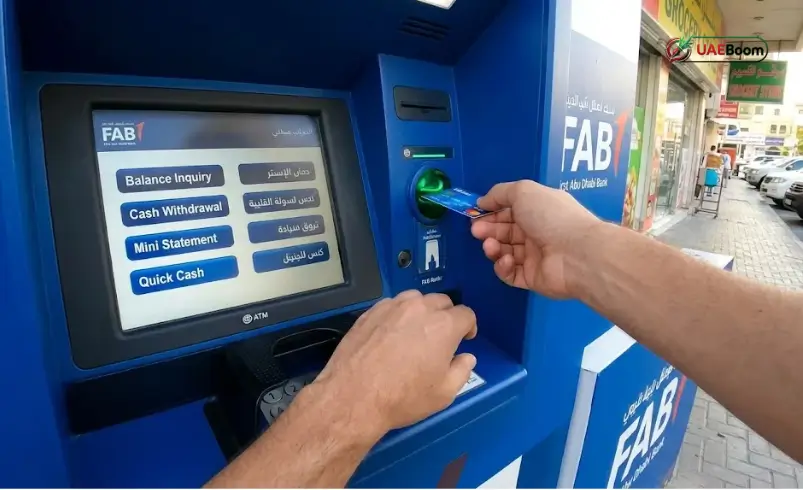
- Find any blue FAB ATM near you.
- Slide your nbad card into the slot and pick your preferred language (English, Arabic, Hindi, Urdu, Tagalog, and Malayalam are available on most machines).
- Cover the keypad with your hand and punch in your 4-digit ATM PIN.
- Tap Balance Inquiry on the screen.
- View your dirham balance on the screen, or print a receipt if you want a paper copy.
Quick Money-Saving Tip: Always try to use an official FAB ATM. While your card works at any bank’s ATM in the Emirates, checking your balance at another bank’s machine charges around AED 1.05, and taking cash out at a non-FAB ATM costs roughly AED 2.00 per withdrawal.
NBAD Balance Check via SMS Banking
If you don’t have internet data, a quick text message will get your balance inquiry nbad sorted in seconds:
- Open the SMS app on the mobile phone number registered with your FAB account or card.
- Type
BALfollowed by a space and the last 4 digits of your card number (for example:BAL 4829). - Send the text to 2121.
- You will get an automated SMS back from FAB within a few seconds showing your current balance.
Calling the 24/7 Customer Care Helpline
If your SMS isn’t registered or your employer is late with payroll and you want to verify if a salary transfer is pending, you can call the bank’s automated phone system or speak to an agent:
| Support Helpline | Phone Number to Dial |
| Ratibi & Prepaid Card Support (Inside UAE) | 600 52 2298 |
| Ratibi & Prepaid Card Support (Outside UAE) | +971 2 499 6279 |
| General FAB Accounts & Cards (Inside UAE) | 600 52 5500 |
| General FAB Accounts & Cards (Outside UAE) | +971 2 681 1511 |
NBAD Online Banking for Personal & Corporate Account Holders
Not everyone searching for nbad online has a payroll card. Plenty of long-time UAE expats and business owners opened checking or savings accounts back when the bank was still called NBAD.
Logging into FAB Online Banking (Formerly NBAD Online)
If you have a full bank account, you can manage everything from your laptop or desktop browser:
- Head to
[www.bankfab.com](https://www.bankfab.com). - Click the Login button at the top right corner and choose Personal Online Banking.
- Log in with your User ID and password (or click Register if it is your first time setting up web access, using your Customer ID or debit card and PIN).
- Once inside your dashboard, click on Accounts or Cards to see your live balances, download official statements, or transfer funds locally and abroad.
Managing Other NBAD Bank Prepaid Cards
Aside from the Ratibi salary card, FAB and Magnati run several other prepaid cards that use the exact same nbad prepaid card balance inquiry tools:
| Prepaid Card Type | What It Is Used For |
| Ratibi Prepaid Card | Monthly WPS salary card for UAE employees earning up to AED 5,000. |
| PayPlus Prepaid Card | Reloadable everyday spending and online shopping card that anyone can top up. |
| Sahala / Government Cards | Prepaid cards used for paying municipal, visa, and government service fees. |
| Multicurrency Travel Card | Reloadable card designed to hold foreign currencies (USD, EUR, GBP) when traveling abroad. |
Salary Advance NBAD & Key Features of Your Card
Mid-month emergencies happen to everyone—whether it is an unexpected medical bill back home or an urgent family expense. That is why salary advance nbad has become one of the most popular searches among Ratibi cardholders.
How Does Salary Advance Work on NBAD / FAB Ratibi Cards?
If you link your Ratibi card to the Payit Digital Wallet app, you can unlock a feature called Money on Demand (salary advance). Instead of borrowing cash from friends or dealing with loan sharks, the app lets you access a portion of your earned wages before payday arrives.
- Who Qualifies: You need an active Ratibi card where your employer deposits your wages regularly, a valid Emirates ID, and a registered Payit wallet account.
- How It Works: Inside the Payit app, tap on the Salary Advance / Money on Demand option. The app calculates how much early salary you are eligible to take based on your regular monthly payroll credits.
- Repayment: There are no confusing interest calculations—just a clear, small flat processing fee shown on screen before you accept. When your next monthly salary lands on your card, the advanced amount is deducted automatically.
Free Insurance, Shopping Perks, and Fees to Watch Out For
A lot of Ratibi cardholders stand at the ATM on payday and withdraw every single dirham in cash. Doing that actually makes your money less safe and causes you to miss out on built-in card perks:
- Free Personal Accident Insurance: Simply holding an active FAB Ratibi card gives you complimentary personal accident insurance coverage worth up to 5 times your monthly salary (up to a maximum of AED 25,000) at zero cost to you.
- Safer Than Carrying Cash: Your card carries the Visa or Mastercard logo, meaning you can tap or swipe it for free at Carrefour, Lulu, Baqalas, pharmacies, and online stores. If you lose cash, it is gone forever; if you lose your card, a two-minute call to 600 52 2298 freezes your money instantly.
To make sure you never lose money to unnecessary bank fees, keep this fee table in mind:
| Transaction or Service | Fee Charged |
| Online Balance Check (Magnati PPC Portal / Payit / FAB App) | Free (Unlimited checks) |
| SMS Alerts on Every Salary Credit | Free |
| FAB ATM Balance Check & Cash Withdrawal | Free |
| Non-FAB ATM Balance Inquiry (Other UAE Banks) | AED 1.05 per check |
| Non-FAB ATM Cash Withdrawal (Other UAE Banks) | ~AED 2.00 per withdrawal |
| Swiping at Supermarkets, Shops & Online (In AED) | Free |
How to Stay Safe From Fake Balance Check Scams
Because so many workers go online looking for an nbad online balance check, phone scammers constantly try to trick Ratibi and FAB cardholders via WhatsApp, SMS, and fake websites. Keep your hard-earned wages safe by remembering three simple rules:
- The Official Portal Never Asks for Your PIN or CVV: To check your balance on the ppc nbad website, you only ever need the last 4 digits of your card number and the Card ID. If a website or caller asks for your 4-digit ATM PIN, your 3-digit CVV code, or an SMS OTP to “check your balance” or “update your Emirates ID,” hang up immediately—it is a scam.
- Check the Website Address: Only enter your Card ID on
ppc.magnati.comorbankfab.com. Never click random links sent in WhatsApp groups or unknown SMS messages. - Report Lost Cards Right Away: If your card goes missing, don’t wait until tomorrow. Open your Payit app to freeze the card or call 600 52 5500 / 600 52 2298 right away so nobody can use it.
Frequently Asked Questions (FAQs)
1. Is NBAD still operating, or is it now FAB?
The National Bank of Abu Dhabi (NBAD) merged with First Gulf Bank to become First Abu Dhabi Bank (FAB). Even though employers and workers still call their cards “NBAD Ratibi” or “NBAD prepaid cards,” all accounts, ATMs, and balance check portals are now run by FAB and its payments subsidiary, Magnati.
2. Where do I find the Card ID on my NBAD Ratibi prepaid card?
Flip your card over to the back and look near the bottom edge underneath the black magnetic stripe. You will see a 13-digit number printed flat on the plastic—that is your Card ID. If the ink has rubbed off, check the original welcome letter envelope your card came in, or call 600 52 2298 for help.
3. Why is the PPC NBAD balance check website rejecting my card details?
This almost always happens when someone enters the 16-digit number from the front of the card into the Card ID box. Put only the last 4 digits of the front number in the first box, and put the 13-digit Card ID from the back of the card in the second box with no spaces.
4. Can I check my NBAD salary card balance using only my Emirates ID?
Not on the web portal, since the website requires your card numbers. However, if you use your Emirates ID once to register on the Payit mobile app, your Ratibi card links to your profile permanently, letting you check your balance anytime with just your fingerprint or PIN.
5. Is checking my FAB NBAD balance free?
Yes, checking your balance is 100% free on the Magnati PPC website, the Payit app, the FAB Mobile app, and at any blue FAB ATM. You will only pay a small fee (around AED 1.05) if you check your balance at another bank’s ATM.
6. How do I check my NBAD balance by SMS without internet?
Using the mobile phone number registered with your card, open your text messages and type BAL followed by a space and the last 4 digits of your card number (example: BAL 1234), then send it to 2121.
7. What should I do if my salary hasn’t shown up on my Ratibi card yet?
First, check with your HR department to confirm they have sent the payroll batch. If HR says it was sent more than 24 hours ago and your nbad ratibi balance enquiry still shows zero, call FAB support at 600 52 5500 or 600 52 2298 to verify if the transfer reached the bank.
8. Can I get a salary advance on my NBAD Ratibi card?
Yes. By downloading the Payit app and linking your Ratibi card and Emirates ID, eligible cardholders who receive regular monthly wages can request an early salary advance straight from the app.
9. How do I get a bank statement for my NBAD prepaid or salary card?
For a quick paper record of your last 10 transactions, insert your card into any FAB ATM and select Mini-Statement. For a full history up to 12 months, register your card on FAB Online Banking or the Payit/FAB app and open the Statement / Transaction History tab.
10. Can I check my FAB or NBAD balance from outside the UAE?
Yes. Both the Magnati PPC web portal, the Payit wallet, and the FAB Mobile app work anywhere in the world over Wi-Fi or mobile data. You can also call the international helpline at +971 2 681 1511 (general accounts) or +971 2 499 6279 (Ratibi support).

[…] thousands of workers across the UAE, Payment Prepaid Cards (PPC)—originally issued through the National Bank of Abu Dhabi (NBAD) and now managed under the First Abu Dhabi Bank (FAB) and Magnati ecosystem—are the […]